If the game won't log you in or the PTR won't start, you most likely need our Battle.net configuration files. Follow the four steps below. It takes about a minute.
Download Blizzard Entertainment.zip
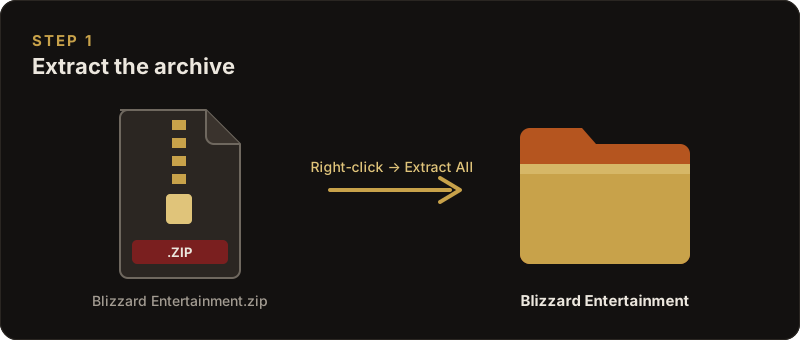
1. Extract the archive
Right-click the downloaded Blizzard Entertainment.zip and choose Extract All. You'll get a folder called Blizzard Entertainment.
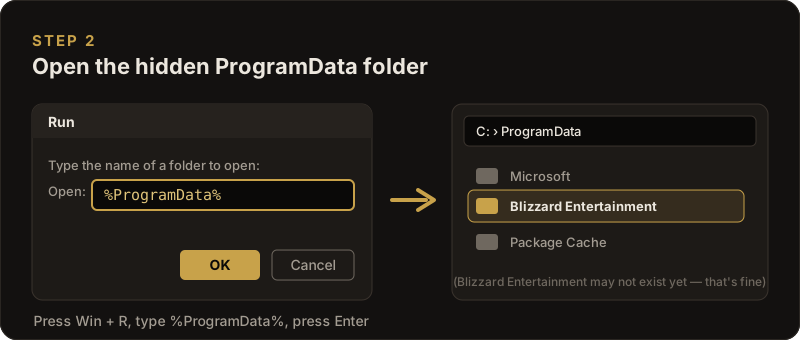
2. Open the ProgramData folder
C:\ProgramData is hidden by default. The easiest way to open it: press Win + R, type %ProgramData% and press Enter.
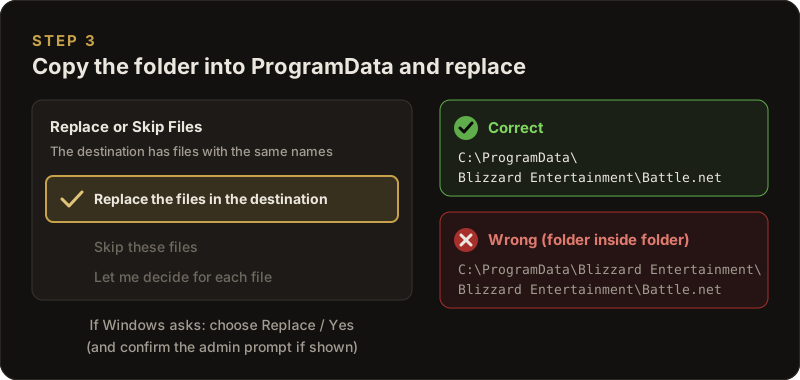
3. Copy the folder in and replace
Copy the extracted Blizzard Entertainment folder into C:\ProgramData. If Windows asks whether to merge or replace files, choose Yes / Replace. If it asks for administrator permission, click Continue.
When you're done, the files must be at C:\ProgramData\Blizzard Entertainment\Battle.net. Watch out for a folder inside a folder (...\Blizzard Entertainment\Blizzard Entertainment\...). That won't work.
4. Start the game
Close the game if it is running. Then open your game folder (Draevor WoW 6.2.3), run Wow-64-Draenor.exe and log in with your account e-mail and password.

Still having problems?
If you get crashes, quest issues, missing files or anything else, please report it on the Bug Tracker or ask in our Discord.